

After building an enterprise data platform on Databricks and ingesting data from across and even outside your organization, a challenge emerges: how can you ensure that only the right users have access to sensitive and restricted data? Historically, Databricks has approached this with Role-Based Access Control (RBAC), often inherited from your hosting cloud provider and tailored to the data asset at hand; however, this was inflexible and could be daunting to scale. Recently, Databricks has been releasing more Attribute-Based Access Control (ABAC) tools, offering new pathways for securing and scoping your data. In this article, we’ll discuss a brief history of access control on Databricks and cover recent motivation and opportunities for ABAC.
Role-Based Access Control on Databricks and Its Limitations
A Brief Intro to RBAC on Databricks
Databricks has long-supported RBAC-styled privileges on data assets, further expanding this effort with the transition to Unity Catalog as the workspace default organization. Privileges can be granted on assets such as catalogs, schemas, tables, clusters, models, and more. For hierarchical structures, permissions are inherited by the derivative assets (i.e., a given table belongs to a certain schema and will inherit any privilege rules applied to the schema). The image below shows what this process looks like:
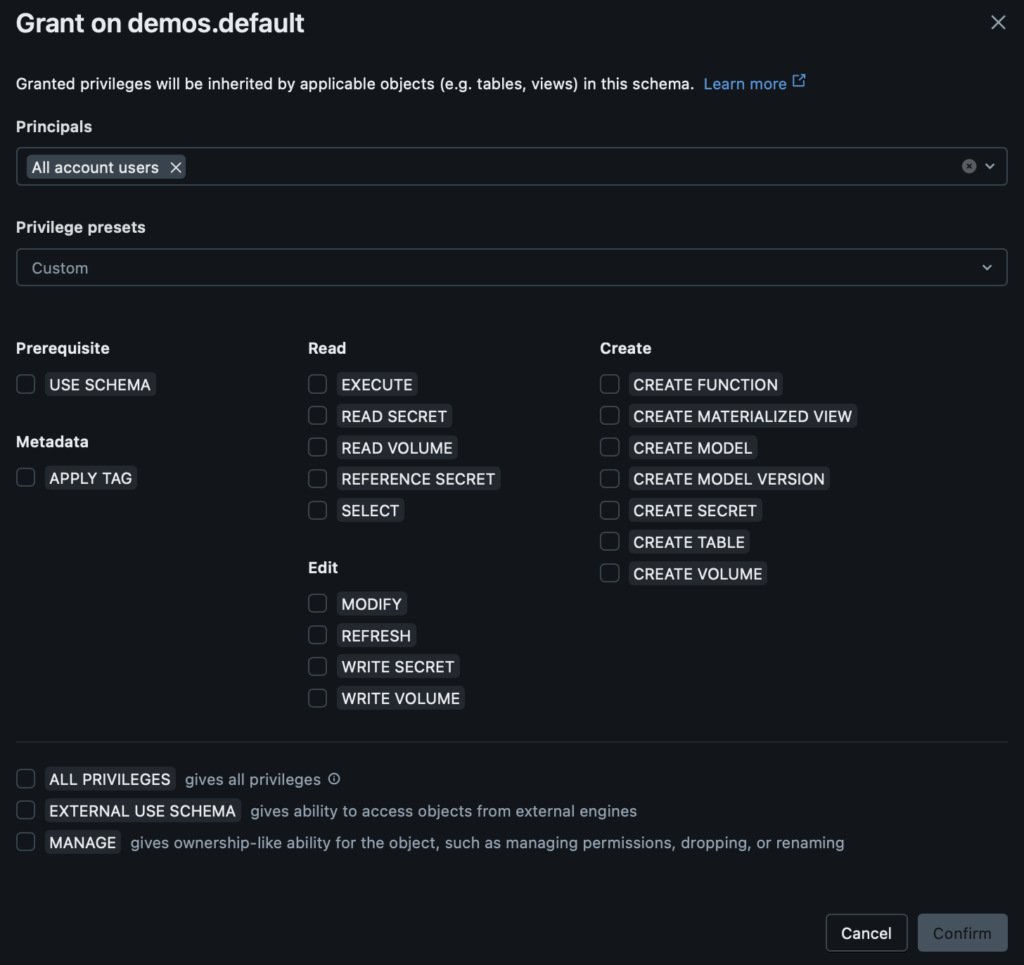
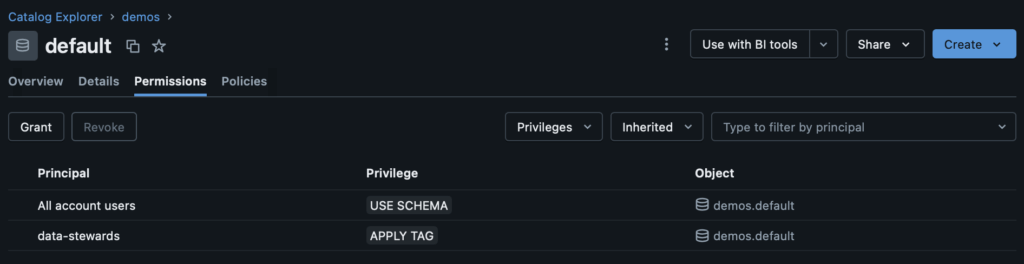
This pattern is the basis for securing data assets on Databricks. As users, groups, and service principals are added, either via a synced identity provider, or directly, those entities can automatically gain permissions that they need. For a more granular approach, those same entities could be given specific grants separate of their inheritances. For example, if I give “All account users” the privilege to “USE SCHEMA”, every user in the workspace will be able to reference this schema in SQL and analogous operations (although they won’t currently be able to read from it). I may separately want to enable my data stewards group “data-stewards” to be able to apply tags to this asset for discoverability and governance. That “APPLY TAG” permission will be specific to members of that “data-stewards” group and not available to members of only “All account users”. This enables me to intentionally specify how members of my Databricks workspace can interact with this data asset and its children:
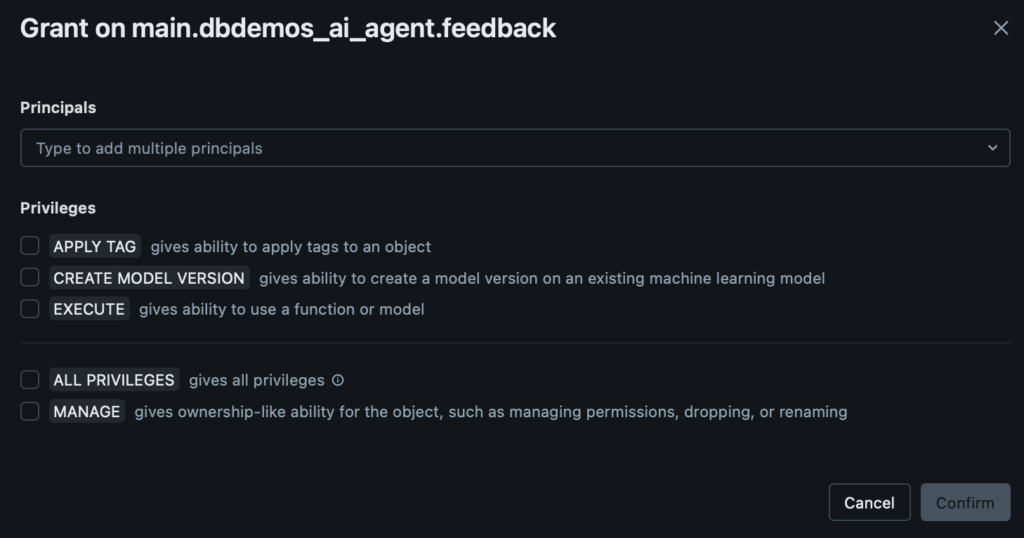
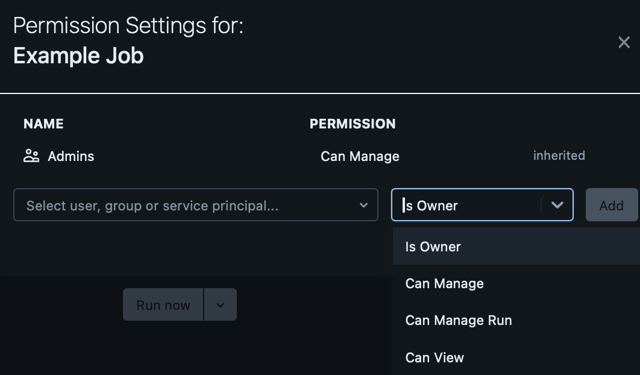
Databricks has done a wonderful job extending this very intuitive pattern across teams and roles across your organization. For example, in the panels below, we can see different behavior options for an ML model and a Databricks job. For the model, we can grant privileges around behaviors that are unique to MLOps, such as the ability to iterate the model version or invoke said model. These behaviors will be intuitive to usage patterns that data scientists and machine learning engineers will know. We have pattern parity for data engineers with the job asset, where we have the ability to view, manage, and manage run (execute) the job. We recommend that you continue to watch these permissions as time goes on because Databricks continues to enrich the assets available, the specific privileges on those assets, and the integration of those assets with Unity Catalog.
Challenges with RBAC Alone
Role-Based Access Control is phenomenally useful and continues to be an integral part of most data management implementations on Databricks and elsewhere; however, it is not without its limitations. With a likely ever-growing number of data assets in your Databricks workspace, your data stewards or subteams must meticulously manage their grants. Whenever someone creates something new, a burden of maintenance and accuracy is placed on your organization.
Especially in highly-regulated fields like finance and healthcare, data losses can be disastrous, potentially leading to substantial losses or irreparable reputation damage. To clearly illustrate this, consider recent examples like the 2024 AT&T data breach, which affected over 7 million customers and has led to a class action settlement valued at almost $200 million, or the landmark 2017 Equifax data breach, which led to a staggering $425 million settlement. Keeping your data safe is pivotal and a strong access control strategy is an essential step.
Whenever a new type of entity (e.g., a newly-minted “dev-ops” group) is created, the privileges for that group have to be somewhat backfilled or inherited via membership of another group. This can lead to additional effort at best and some confusing crossed-intentions if we do something like make “dev-ops” a member of “data-stewards” so that that “dev-ops” team can inherit the ability to “APPLY TAG” on existing data assets like the schema above.
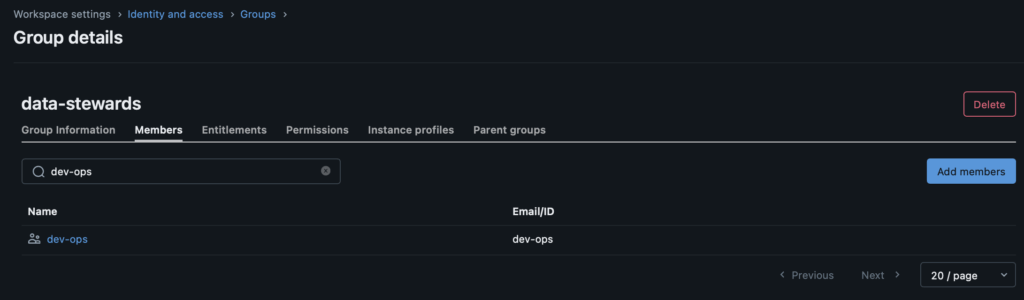
This hints at an even more fundamental problem: RBAC offers very little in the way of nuance. With RBAC, you either have a permission or you do not. When granted “READ” on a table, you can see all of the values in that table, regardless of if all of that data is relevant to you or not. When the data is not sensitive, this is mostly an annoyance for end users, who will have to search through unrelated content to find what they need, but when data access needs to be restricted, this can be a damaging flaw.
With RBAC alone, we are pushed toward an explosion of roles and data assets that wastefully encompass subsets of each other. For an example, let’s take a look at the Databricks sample “tpch” dataset. We can see that there are a lot of descriptors and financial metrics as well as a variety of grouping keys such as nation and market segment.
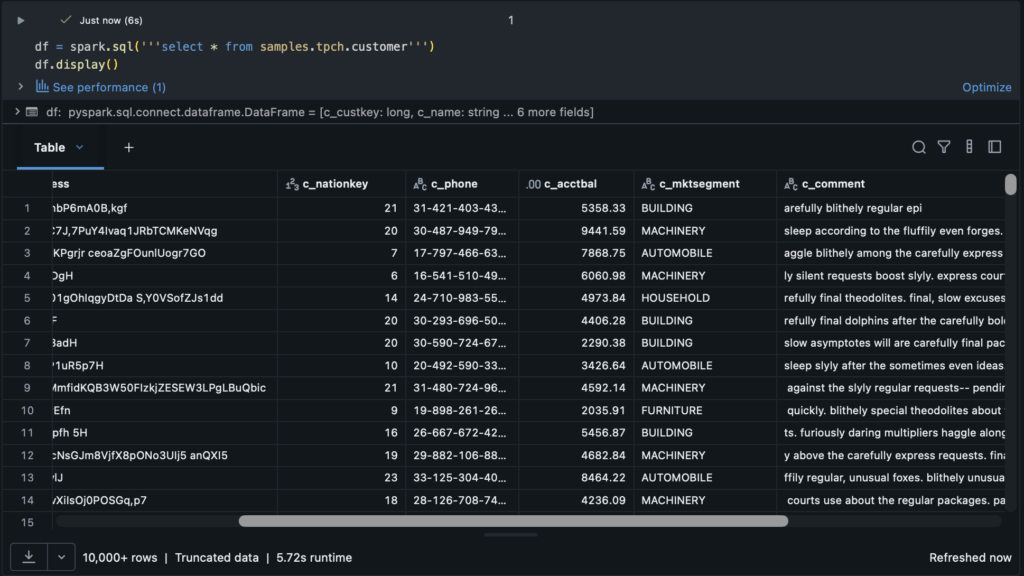
What if this data were extremely sensitive? What if our team representatives in different market segments should not have access to other market segment data? With RBAC alone, our main recourse is going to be splitting up this table by segment and subsequently splitting up access:
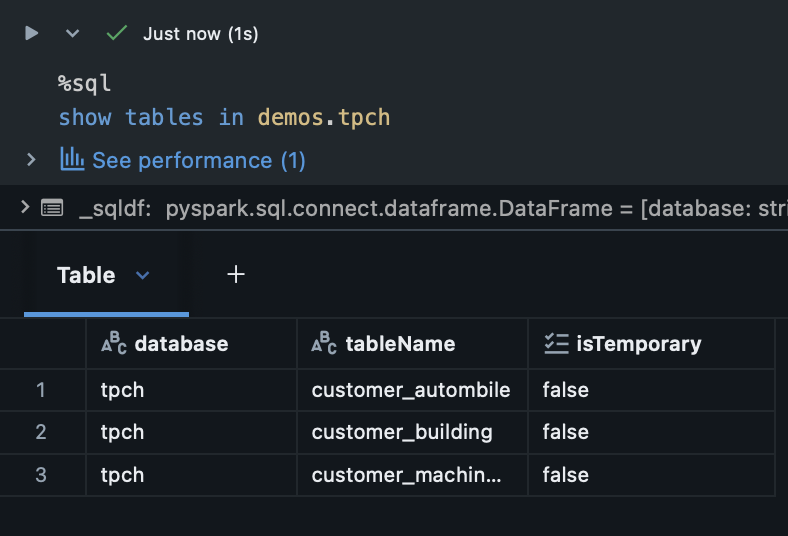
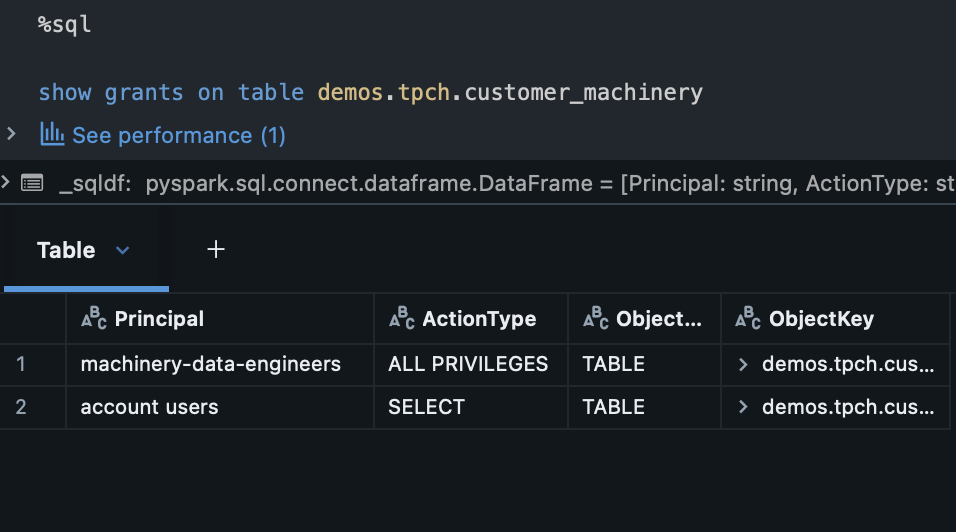
This is already a headache for a single data asset with a few teams. What if we had hundreds of teams? Thousands of data assets? Role-Based Access Control alone cannot scale for fine-grained data management policies beyond simple implementations. We need something more.
Working with a public sector customer, we recently dealt with over 300 unique roles and counting. With a combination of groups and ABAC tags, this same organization model can be represented by around 60 roles and 20 tags!
Leveraging Attribute-Based Access Control for Flexibility and Scale
Now that we have covered RBAC in Databricks, we can move on to the industry-wide shifts toward Attribute-Based Access Control (ABAC). If entities are the basis for RBAC, tags and policies are the basis for ABAC. Let’s start with tags.
Governed Tags in Databricks
Governed tags are currently in Databricks Public Preview and can be enabled in your workspace by an administrator. Governed tags are plaintext labels that can be applied to any asset within Databricks and provide the benefit of tag-driven policies for governance. Currently, workspaces can hold up to 1,000 governed tags. Following along our previous example, let’s create a tag that lets us know that our data has sensitive financial content:
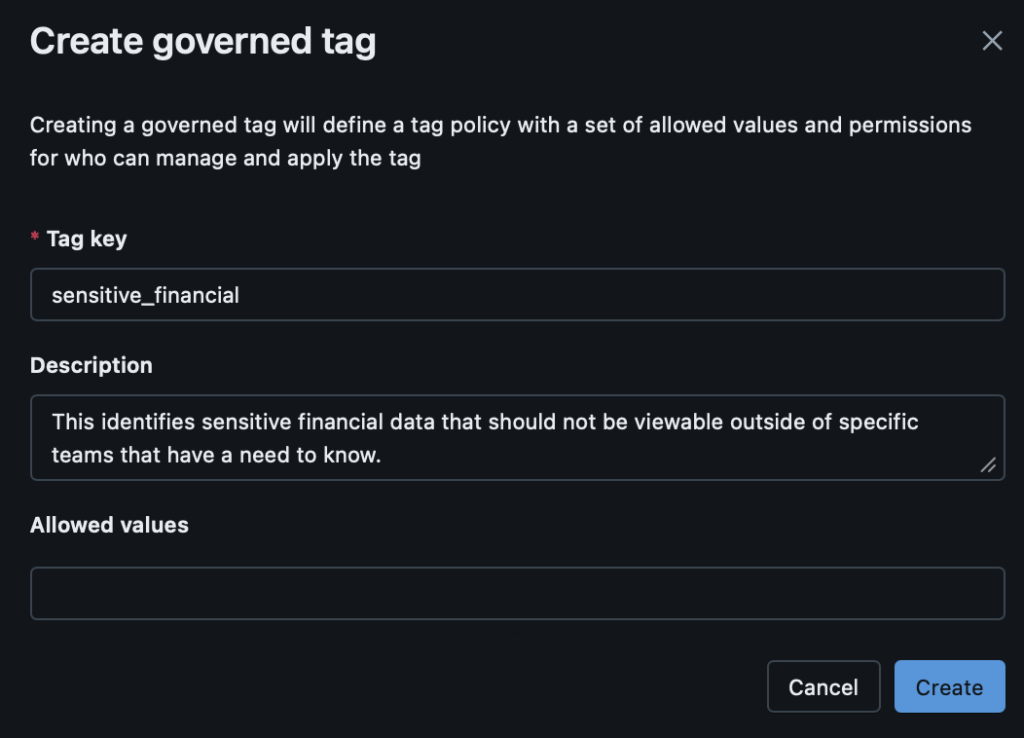
That’s about it! We can specifically set allowed values for the tag, for even more nuanced control. More generally, governed tags can be used to identify PII, restricted data, deprecated assets, business-specific logic, enable workflow automation, and more!
ABAC Policies on Databricks
Once we have defined governed tags to our business needs, we can next generate policies off of these tags to enforce access requirements that we may have. Policies are applied across the workspace and can be tied to catalogs, schemas, or tables within the overarching Unity Catalog hierarchy. Like RBAC grants, policies are inherited by child levels of the hierarchy; however, unlike RBAC grants, policies can apply to different users in different ways without needing to be rewritten or rescoped for each user and asset. There are currently two main types of policies: column masking and row filtering.
Column Masking Policies
The first ABAC policy we’ll cover is column masking. Column masking is useful when you want to share all of the data asset with relevant users, but may need to have different controls in place for sensitive information like social security numbers, addresses, or like our previous example, account balances. With a pure RBAC policy, you would need to specifically hide sensitive or restricted information in views or duplicate tables or even possibly decide that sharing that asset with other users was not worth the time it would take to set up that restricted access pattern. Column masking empowers users across the workspace to be able to leverage data assets safely and as completely as their role requires, while still preserving customizable privacy constraints. Let’s look at what setting up a column mask policy looks like:
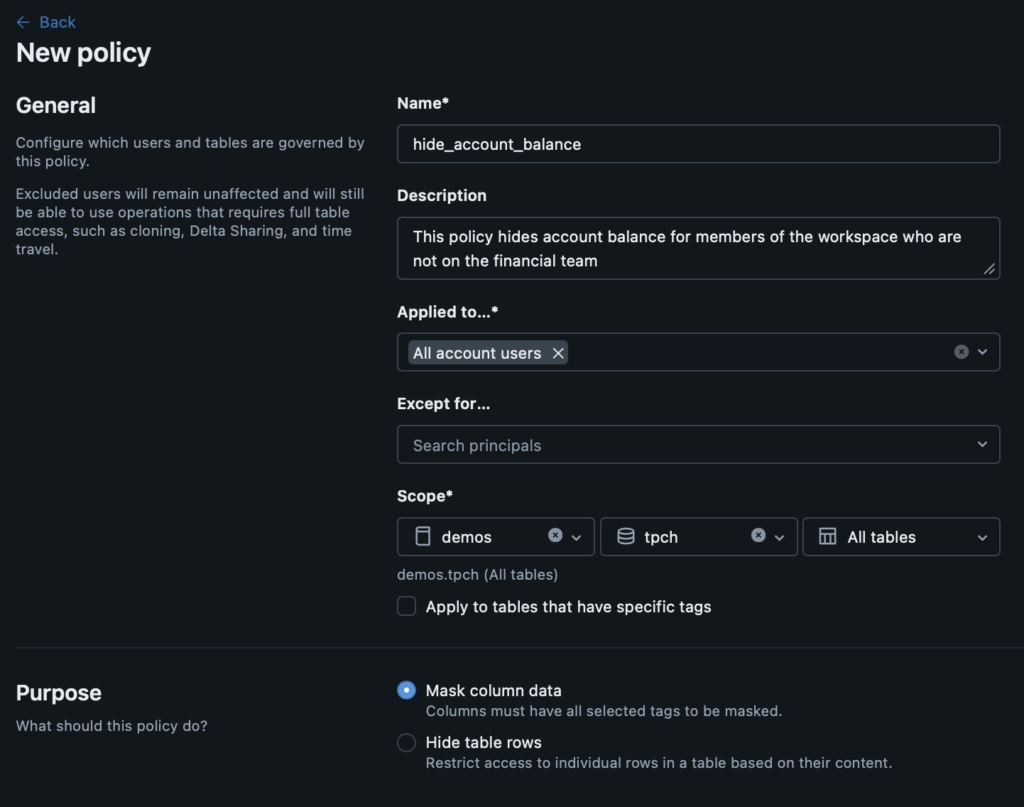
You create a column masking policy directly on a catalog, schema, or table and then define who it will apply to and how. Here, we have selected that this policy will apply to “All account users” which means that we exhaustively cover anyone using our workspace. You have the option to apply the policy to specific assets with specific tags as well, offering further customization. After selecting the “Mask column data” radio button, you’ll see the following:
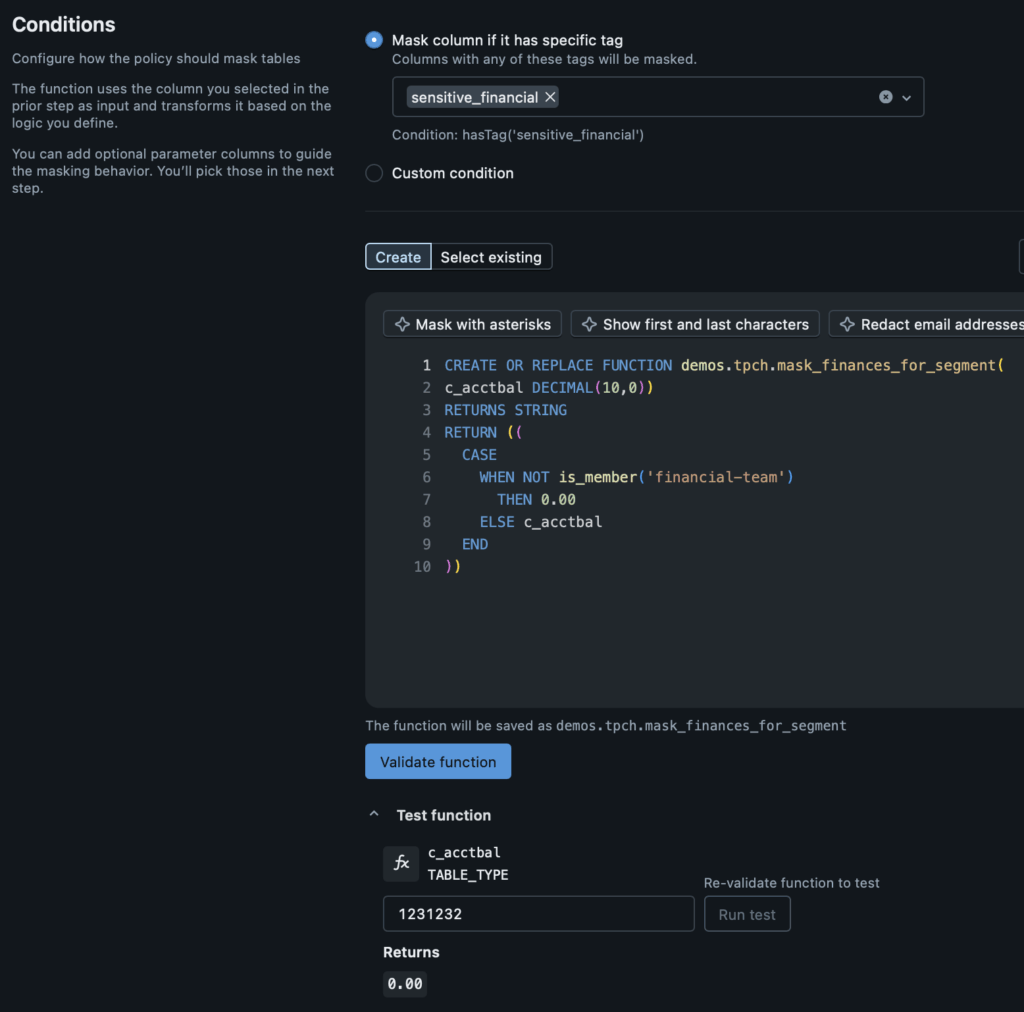
The configuration allows you to pick specific column attributes to apply your column mask to (for example, columns with the “sensitive_financial” governed tag). Afterward, you can create a SQL-defined function for what your mask will do. In this case, we will look for the “c_acctbal” column in our “tpch” tables and if we are not a member of the “financial-team”, we will return “0.00” to preserve the privacy of our customers. If we are a member of the “financial-team”, we will see the actual value.
After creating the SQL logic, you can validate your function with an active SQL warehouse compute to test for any misconfiguration. Subsequently, you can even test the permissions on yourself to see what the returned value should be. I am not a member of the “financial-team”, so when I look for data in the “c_acctbal” column, I will only see “0.00”. Next, let’s apply this policy to our table and see what things look like from a notebook or SQL query!

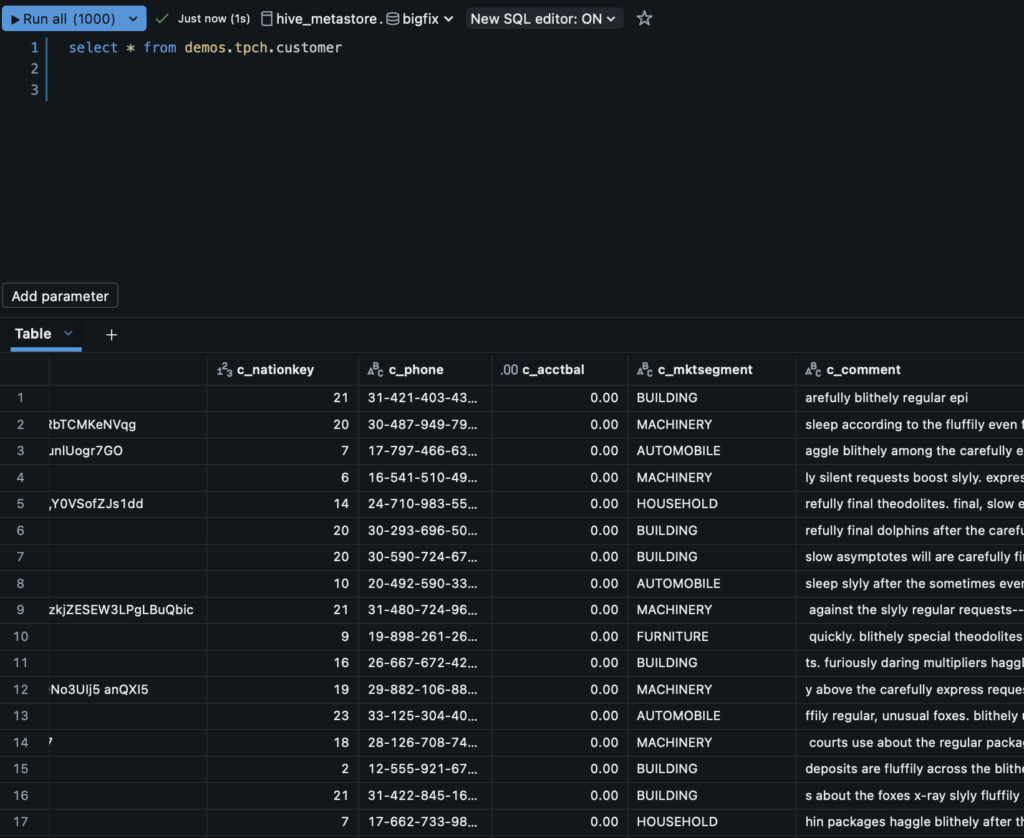
Because of how we applied the column mask, we are now unable to see the sensitive financial data for our customers because I am not a member of the “financial-team”. This will apply across modalities in the organization, including notebooks, SQL queries, and any draws on the Unity Catalog tables. To summarize, column masks are helpful when we want to share our actual, unmodified data across the organization, but need to protect specific aspects of it.
Row Filtering Policies
The other major ABAC policy paradigm on Databricks is row filtering. In this case, we do not need or want to share rows across the organization, we really are more interested in giving specific teams and users exactly what they need and not showing anything else. For example, if I am an analyst in our US region, I need to have access to US region sales data; however, I may not need access to EU region sales. Rather than making some heavy handed “us-region” team and view that I might have to use with pure RBAC, I can use row filters to guarantee only the right information is shared. Let’s follow our same example and build a function to hide market segment data for “MACHINERY” when I am not a member of the “machinery-team”:
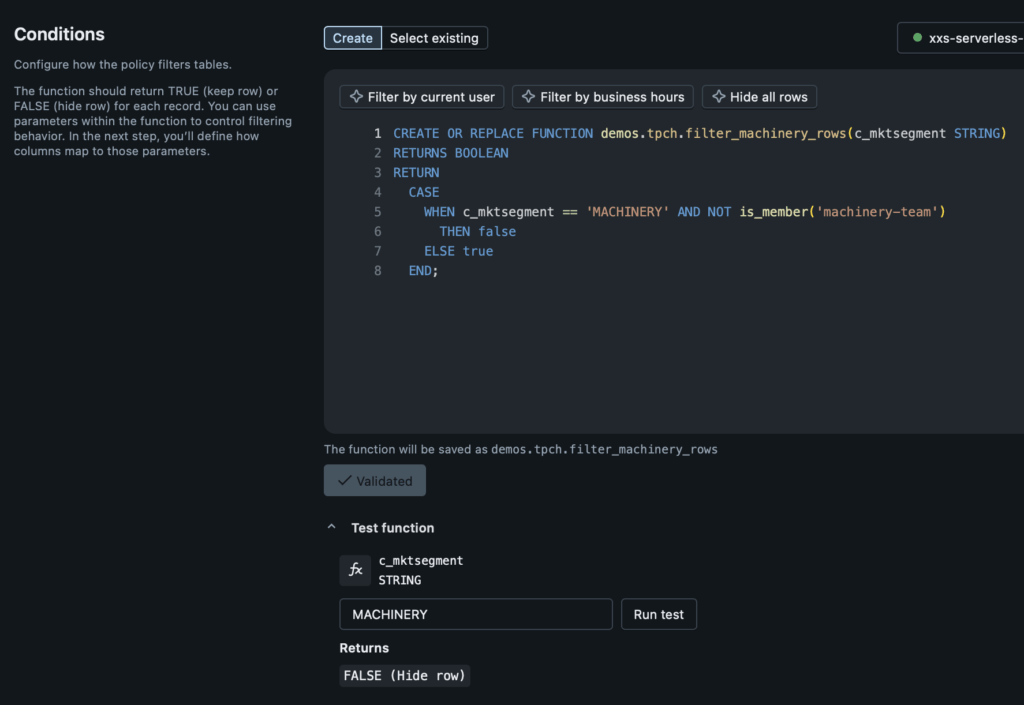
As expected, because I am not a member of the “machinery-team” I should not expect to see the rows. Now, let’s show what it looks like before and after I apply the policy. Initially, I have five groups that are relatively evenly distributed by counts. I’ll then apply the governed tag “region_restricted” which the row filter function uses to identify points for determining what market segment we’re in:
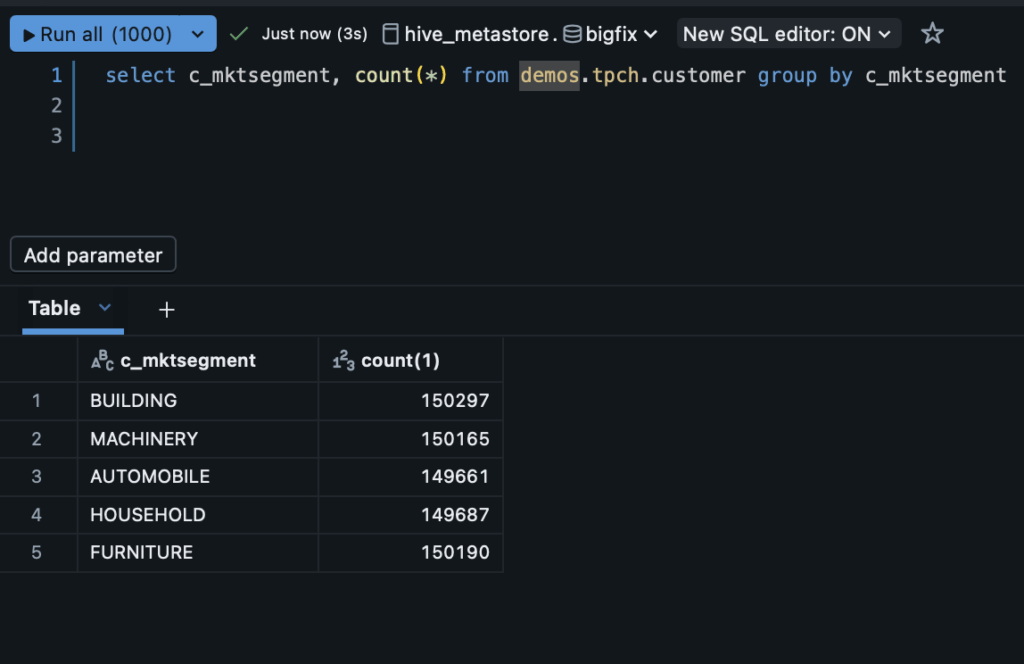
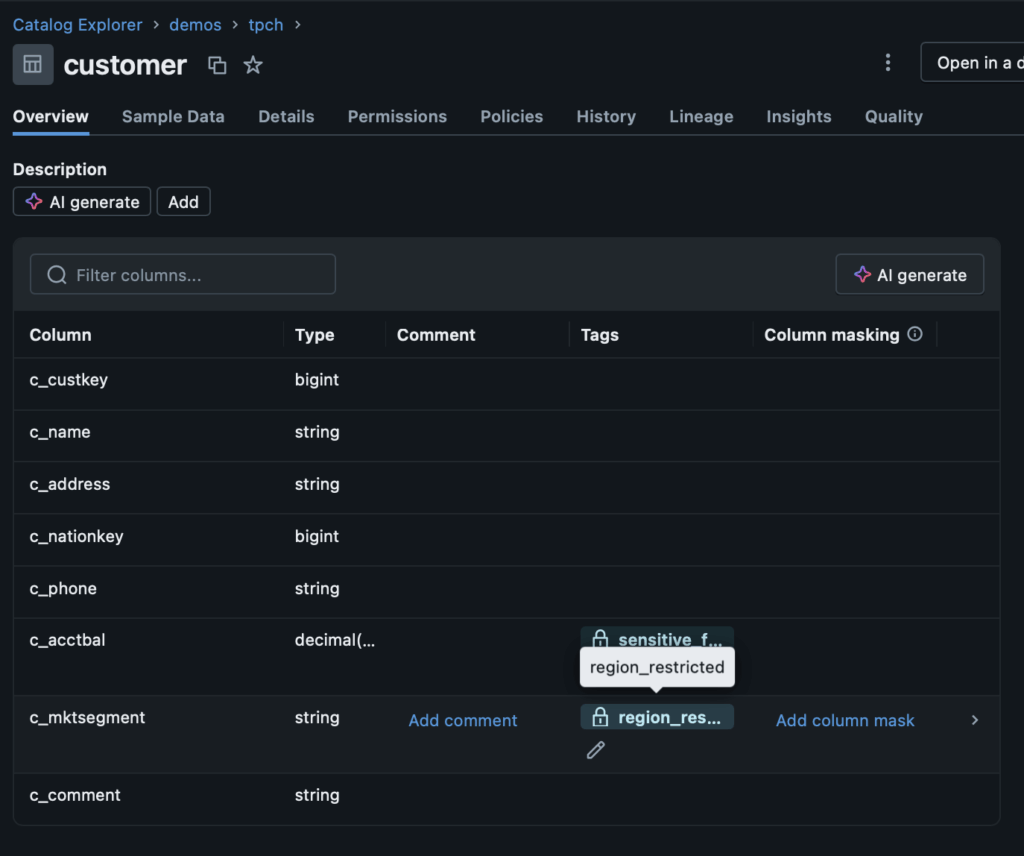
After applying the row filter, when I go back to execute the same query as before, I only see four categories. This is as expected because I am not a member of the “machinery-team”. It’s as though that data does not exist to me:
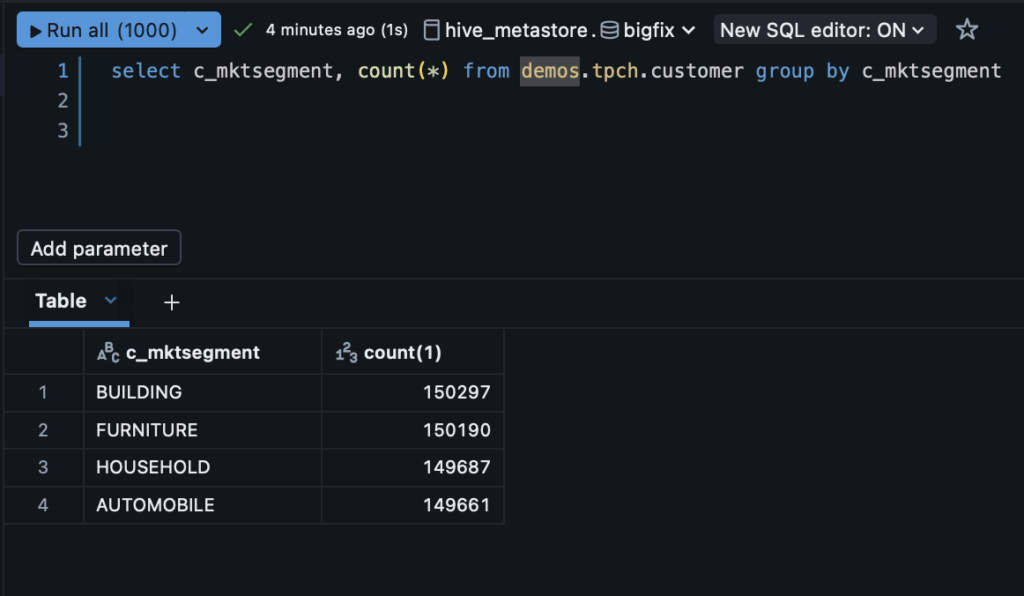
This is immensely powerful because we are able to control exactly who should see what based on how it is tagged. For example, you can imagine that in situations like case management, if there are enough PII fields in a given row that they could be combined to uniquely identify someone, we could apply a filter to prevent those rows from being visible to all but very specifically elevated users. To summarize, row filters are helpful when we want to scope our data access to specific users and teams and hide entire rows of data from users that do not have need to know or relevance to those rows.
How Does ABAC Help You Scale?
We’ve gone into pretty substantial detail on how Attribute-Based Access Control works and alluded to how it can fill in for some of the limitations Role-Based Access Control, but let’s be more direct: how will adding ABAC improve your ability to manage access control? Here are a few fundamental ways:
Flexible Time-Forward Access Control
With RBAC, when you give an entity permission to use a data asset in some way (read, write, modify, etc.), that permission is static. You cannot generalize it to other entities effortlessly and you cannot make that same grant apply to new data assets other than via hierarchical inheritance. This locks you into a challenging mix of customized entities and grants that must be managed continuously. What if your company undergoes a reorg? Suddenly, it may no longer make sense that your “Financial Data Analysts” is separate from your “finance-team” and you are going to have to go back and clean up those old grants while applying the new ones!
ABAC is different because tags and policies represent business intent instead of roles and org structure. When I define a governed tag for “health_pii” it is easily understandable what the intent of that label is. Further, when that label is applied to a data asset, it can be traced through data lineage throughout downstream data assets, meaning I don’t have to go exploring or guess the origin.
More importantly, when I apply that “health_pii” tag and create a policy like “hide_health_pii_details_from_general_users”, that policy is generic and flexible to the future. When I add a new team to my organization, I don’t have to go through and audit all the grants to make sure that non-privileged users cannot see “health_pii”, I simply let the policy do the enforcement for me!
Data Visibility and Fine-Grained Control
As noted before, with RBAC, you typically have to make a complicated combination of domain-specific teams with intentionally siloed data to make sure that everyone can do what they need without having a misaligned view into sensitive data. This is costly both from a time and literal data storage perspective, and with ABAC, is totally unnecessary!
ABAC allows us to apply very finely-grained access control policies that can either mask column information or completely filter out rows. This means that we do not have to create those extra views or tables or manage all of those unnecessary role groups. Instead, we can just let the access policies manage the data access at the time of a given request. This means that we do not have to spend on the overhead of managing the extra tables and teams and we still gain the benefits of sharing data across the organization widely, but safely.
Tags and Policies Can Be Automated and Audited
One more positive aspect to ABAC is that it opens up substantial avenues for automation of data governance. With RBAC, roles and data assets can diverge from themselves and each other over time, so automation efforts can be wasted if the underlying permissions change. Conversely, combining ABAC with strategies like natural language processing (NLP) enables accurate identification of potentially sensitive fields. For example, a social security number always follows the same pattern – if our automated workflow sees data matching that pattern, we can apply a “PII” flag and alert a data steward for review.
Conclusions
Access policies are at the core of data platforms because they enable audibility and control over who can see, modify, use, and share data assets. An improperly-configured access policy can be catastrophic for any organization and it is important to use the right tools for the job.
Historically, Databricks has extensively supported Role-Based Access Control (RBAC) techniques. These patterns match individual users, teams, and service principals with data assets they have varying permissions to use based on grants. This works well for when everyone on a given team should be able to see all fields, but breaks down as organization structure becomes more complicated and nuances emerge. If we make a special role and data asset for every type of behavior that we expect to see across an organization with tens of thousands of users, thousands of groups, and hundreds of thousands of data assets, we will fall behind on our access policy efforts and likely never catch up!
More recently, Databricks has been releasing enhanced Attribute-Based Access Control (ABAC) tooling. These tools are different than RBAC because they are based on tags and policies that can mean different things for different entities rather than something black and white. Further, they open up the possibility of row and column level specificity for access control policies so that you do not need to spend all of the extra effort hiding a given sensitive value from users in a new table or view. Instead, you can simply prevent non-privileged users from seeing those values entirely!
From a scaling perspective, access control becomes a much more tractable problem with ABAC. Rather than reinventing the wheel each time a new team comes online or a new data source is added, we can simply use tags and our preexisting policies to control who can see what across the organization. Similarly, if we ever decide to change our ABAC definitions, all we need to do is change the tag or the policy that we’re interested in, rather than exhaustively traveling through all of our data assets and users!
Finally, ABAC on Databricks is easy. One of the key challenges with ABAC adoption is how foreign it can feel when we have become so used to RBAC. ABAC requires a very intentional design and has historically been expressed through things like XACML that require deep subject matter expertise. Databricks has sharply lowered the barrier to entry for ABAC by leveraging familiar SQL-style patterns with UI that meets every type of user.
ABAC typically does not replace RBAC (although it can in special instances). We encourage an intentional approach that balances the elements of RBAC that are strong, such as syncing with your identity provider to make users and teams that have permissions on specific catalogs, schemas, and tables. On top of this foundation, layer the nuanced requirements for access to certain rows, columns, and fields that should be driven by ABAC. It is much, much easier and safer to control who is allowed to see “PII” fields in the “customers” catalog than to make data assets that are safely scoped to all users (or worse, restrict users who could drive value for your business because setting up safe access on that data is prohibitively slow or expensive).
We invite you to connect with us to collaborate on how to enable best practices in your enterprise data platform.


